KITCHEN

FLOW

From chaos to compostable precision. An inventory system built for the high-speed reality of modern vegan kitchens

ROLE

Product Designer

UX Research, UI, Prototyping

TIMELINE

10 Weeks

Spring 2025

THE PROBLEM

Manual inventory in high-volume kitchens is error-prone and physically exhausting, leading to significant food waste.

THE OUTCOME

KitchenFlow transformed chaotic counting into a spatial, fast, context-aware workflow, reducing inventory time by 50% in pilot tests.

ROLE

Product Designer

UX Research, UI, Prototyping

TIMELINE

10 Weeks

Spring 2025

THE PROBLEM

Manual inventory in high-volume kitchens is error-prone and physically exhausting, leading to significant food waste.

THE OUTCOME

KitchenFlow transformed chaotic counting into a spatial, fast, context-aware workflow, reducing inventory time by 50% in pilot tests.

ROLE

Product Designer

UX Research, UI, Prototyping

TIMELINE

10 Weeks

Spring 2025

THE PROBLEM

Manual inventory in high-volume kitchens is error-prone and physically exhausting, leading to significant food waste.

THE OUTCOME

KitchenFlow transformed chaotic counting into a spatial, fast, context-aware workflow, reducing inventory time by 50% in pilot tests.

The Client

Val's Vegan Kitchen

San Diego

Val’s Vegan Kitchen is a San Diego–based, plant-based restaurant used as a real-world client for this project.

Val’s Vegan Kitchen is a San Diego–based, plant-based restaurant used as a real-world client for this project.

Professor Micheal

"Kitchen flow turned messy, manual inventory into a smooth reliable workflow for busy kitchens"

The "Kitchen Reality"

Inventory isn’t a background task — it’s part of the production line.

High Waste Risk

Perishables expire fast. Small inventory errors create real waste.

Cognitive Load

Missing context slows decisions and increases errors.

High Velocity

Orders come in from 4 apps simultaneously.
ORDER #404
SYSTEM ERROR
1×Dirty Burger
Unavailable
2×Strawberry Shake
Unavailable
1×The Triple J
$14.00
CAUSE: INVENTORY NOT UPDATED

TARGET USER

Profile picture

The Line Cook (Inputting user)

Works during rush periods. Prioritizes speed and low effort over precision.
Needs to update inventory quickly without breaking workflow.
Profile picture

The Manager (Quantity-reading user)

Reviews inventory outside of rush hours.
Needs clear totals and location breakdowns to make ordering decisions.

RESEARCH QUESTIONS

1

Can we reduce the time it takes to count a single item from 12s to under 5s?

2

How can we structure the data to match the physical layout of the kitchen?

3

What input method minimizes errors for users with "fat fingers" or gloves?

ID
Item Name
Storage Zone
Category
001
Vegan bulgogi beef
Walk in freezer
Faux Beef
002
Nuggets
Kitchen Freezer
Faux Chicken
003
Vegan PepperJack Slices
Small Fridge
Cheese Slices
004
Tomamto
Deli Fridge
Veg & Herbs
005
Diet Coke
Deli Fridge
Carbonated
006
Siracha Sauce
Dry Storage
Sauces
+ 247 more rows
ID
Item Name
Storage Zone
Category
001
Vegan bulgogi beef
Walk in freezer
Faux Beef
002
Nuggets
Kitchen Freezer
Faux Chicken
003
Vegan PepperJack Slices
Small Fridge
Cheese Slices
004
Tomamto
Deli Fridge
Veg & Herbs
005
Diet Coke
Deli Fridge
Carbonated
006
Siracha Sauce
Dry Storage
Sauces
+ 100 more rows

RESEARCH PHASE

Field Work: The 150+ Item Audit

Field Work: The 150+ Item Audit

Field Work: The 150+ Item Audit

I modeled the restaurant’s inventory in Google Sheets, logging 150+ ingredients to understand real inventory behavior.

Two structures were tested

  1. category-based

  2. location-based

9
ITEM CATEGORIES
Distinct categories and subcategories used to organize inventory by ingredient type.
7
Storage Zones
Physical locations where inventory is stored and updated during daily workflows.
9
ITEM CATEGORIES
Distinct categories and subcategories used to organize inventory by ingredient type.
7
Storage Zones
Physical locations where inventory is stored and updated during daily workflows.

User Flow

User Flow

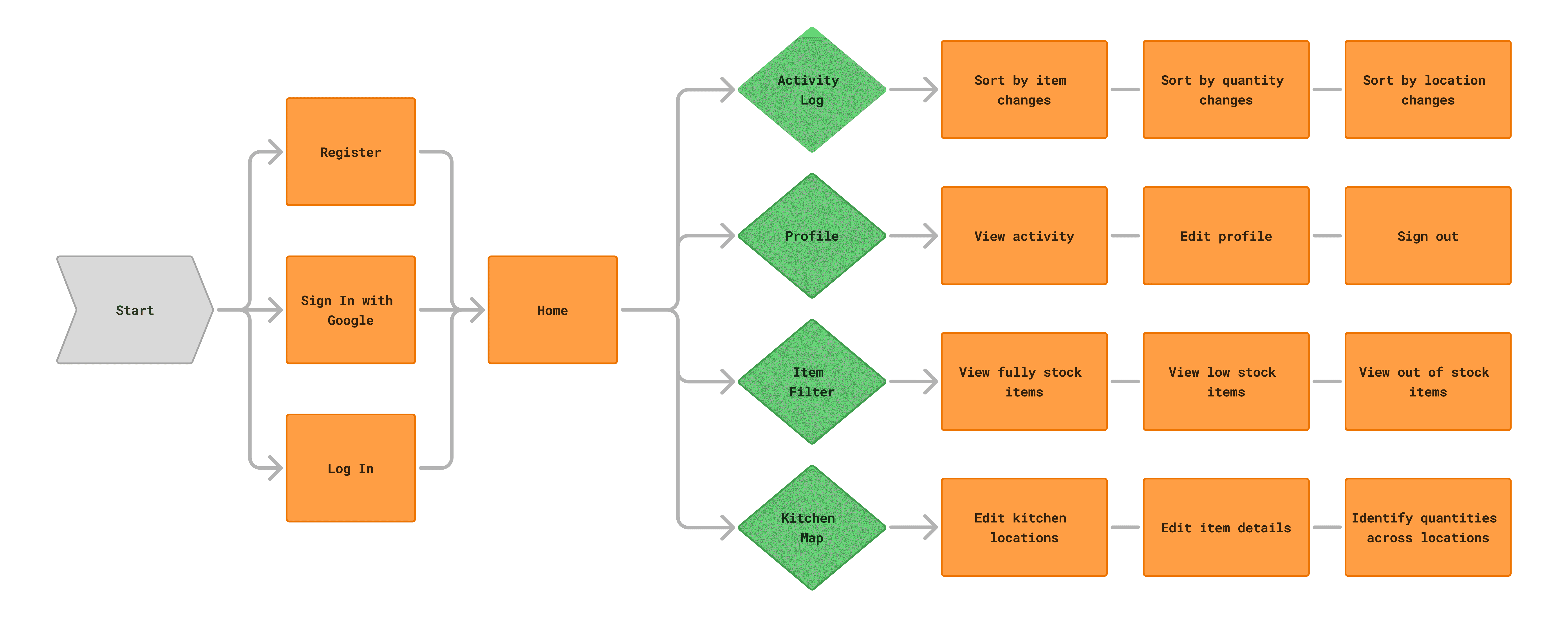
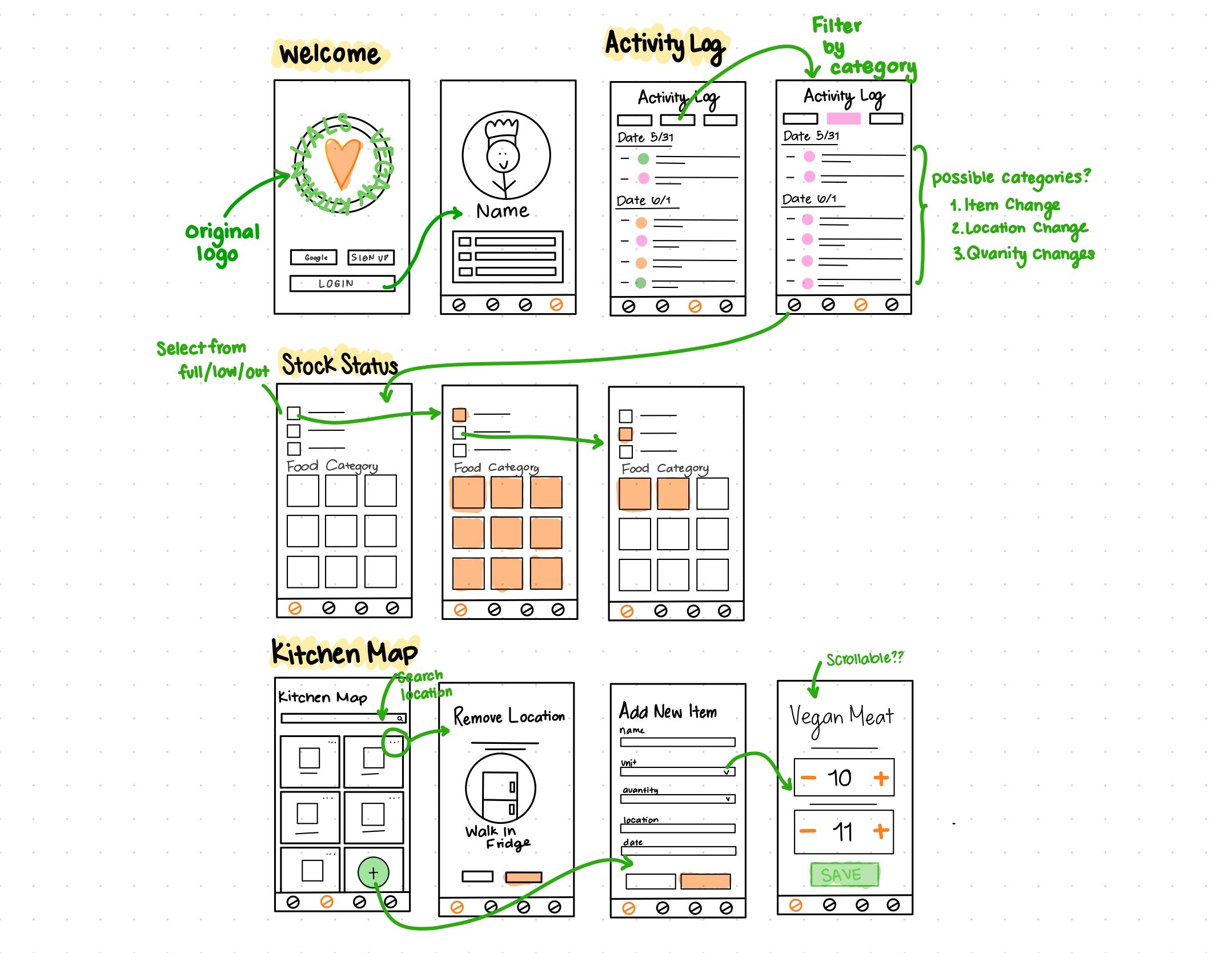
A location-first user flow designed to reduce inventory updates to just a few quick taps.

The Blueprint Phase

The Blueprint Phase

The Blueprint Phase

We mapped the mobile user flow first to reflect real kitchen inventory behavior, using a location-first structure to validate navigation and task order before visual design.

Stress-Testing the Prototype

We didn't just ask "do you like it?" We simulated the worst-case scenarios of a real kitchen: end-of-shift fatigue, greasy hands, and extreme time pressure.

The 2-Minute Drill

Quick usability tests with paper prototypes to validate core user flows and identify friction points early.

👥

Real User Feedback

Conducted sessions with 8 participants to observe natural interactions and gather qualitative insights.

🎯

Iterate & Refine

Used findings to prioritize design changes, reducing cognitive load and improving task completion rates.

The 2-Minute Drill

Quick usability tests with paper prototypes to validate core user flows and identify friction points early.

👥

Real User Feedback

Conducted sessions with 8 participants to observe natural interactions and gather qualitative insights.

🎯

Iterate & Refine

Used findings to prioritize design changes, reducing cognitive load and improving task completion rates.

🔍

Key Friction Points

Low-fi testing helped us identify where the spreadsheet-inspired structure broke down when translated into a mobile workflow.

1

Unit Confusion

Users struggled to interpret inconsistent units (oz, lbs, bunches, cases), making it difficult to enter quantities confidently without second-guessing.

2

Input Friction

Updating quantities item-by-item required repetitive taps, slowing down inventory taking and increasing fatigue during fast-paced kitchen scenarios.

3

Location Blindness

Without a clear sense of storage zones, users couldn’t easily confirm whether they had fully counted a space (e.g., Walk-In Freezer) before moving on.

🔍

Key Friction Points

Low-fi testing helped us identify where the spreadsheet-inspired structure broke down when translated into a mobile workflow.

1

Unit Confusion

Users struggled to interpret inconsistent units (oz, lbs, bunches, cases), making it difficult to enter quantities confidently without second-guessing.

2

Input Friction

Updating quantities item-by-item required repetitive taps, slowing down inventory taking and increasing fatigue during fast-paced kitchen scenarios.

3

Location Blindness

Without a clear sense of storage zones, users couldn’t easily confirm whether they had fully counted a space (e.g., Walk-In Freezer) before moving on.

Finding the Fastest Input Method

Finding the Fastest Input Method

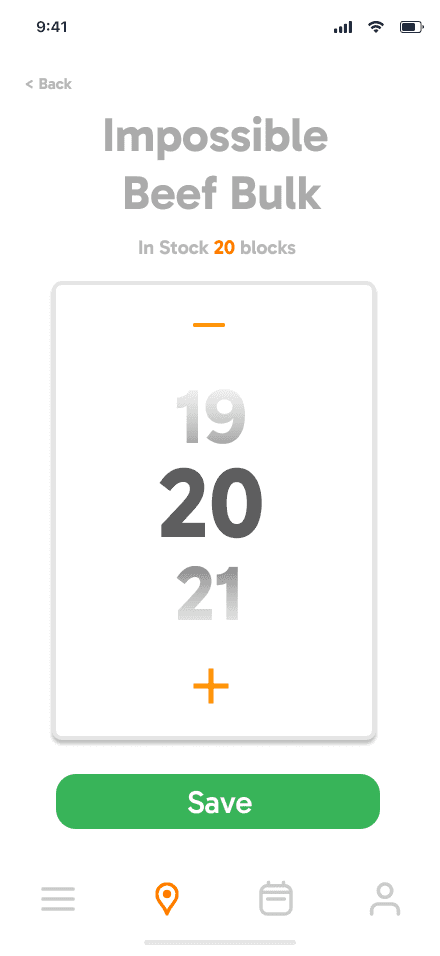
We A/B/C tested three input patterns with kitchen staff to identify the fastest and least fatiguing option for inventory updates.
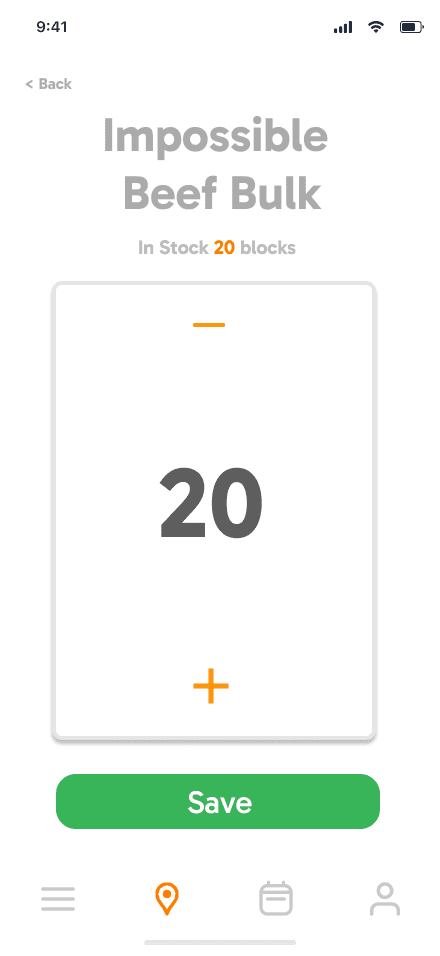
OPTION A

Tap-To-Increment

Avg Entry Time13.4s
Quick Readability
Requires multiple tap's for large #'s
OPTION B

Scroll Wheel

Avg Entry Time8.3s
Less taping
Hard to land on exact #
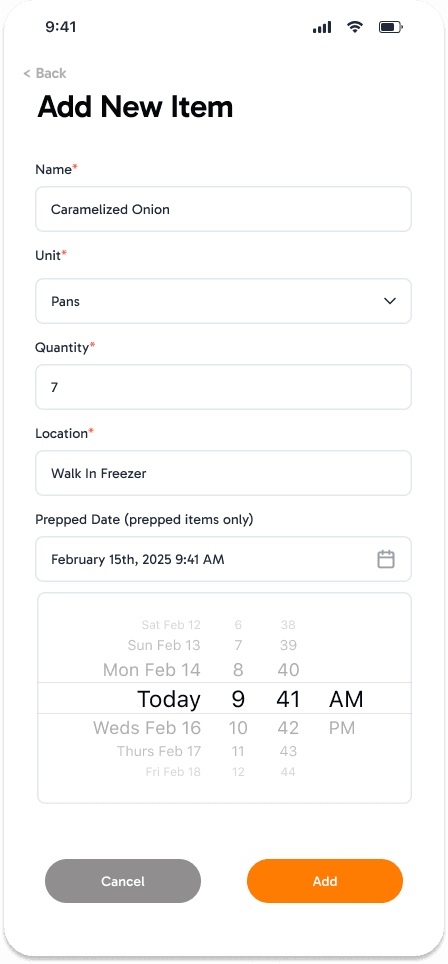
OPTION C
Winner

Hybrid Form

Avg Entry Time4.1s
Faster entry speed
Separate by location

Insights from Testing

Clarity

Clarity

Clarity

"Is that a 1 or a 7"

“I can’t read this font when the tablet is on the counter and I’m 3 feet away.”

The Fix
Switched to monospaced numerals and increased quantity font size for better readability at a distance.
Fatigue

Fatigue

Fatigue

The "Keyboard" Barrier

The "Keyboard" Barrier

The "Keyboard" Barrier

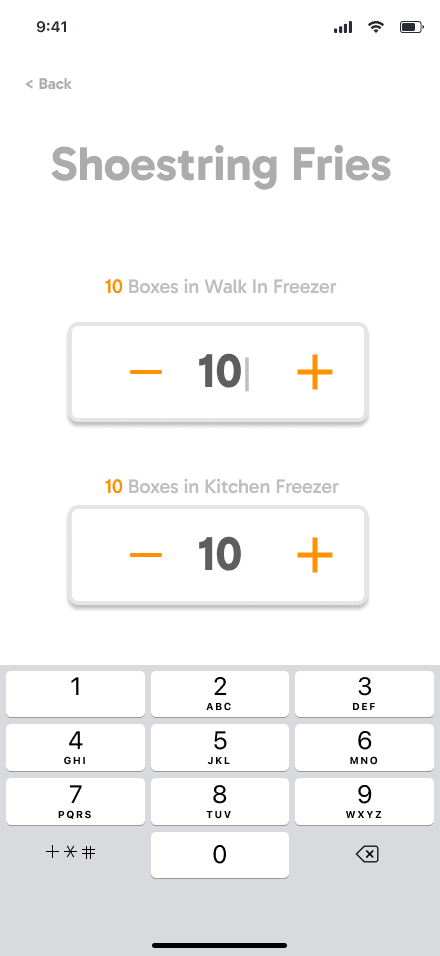
“Bringing up the keyboard for every single item is annoying. It covers the list.”

The Fix
Replaced constant keyboard use with a hybrid input using inline +/- controls and optional direct entry.

Visibility

Visibility

Visibility

Totals Should Be Immediate

Totals Should Be Immediate

Totals Should Be Immediate

“I had to add everything in my head to know how much we actually had.”

The Fix
Elevated “Total On-Hand” into a prominent header to eliminate mental math.
Context

Context

Context

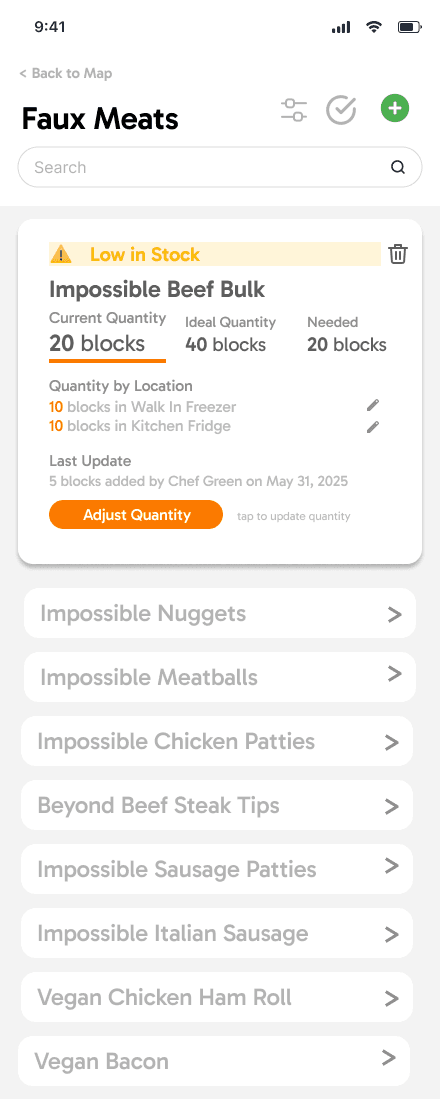
Which location am I Editing

“I had to add everything in my head to know how much we actually had.”

The Fix
Labeled quantity controls by location and showed per-location counts alongside the total.

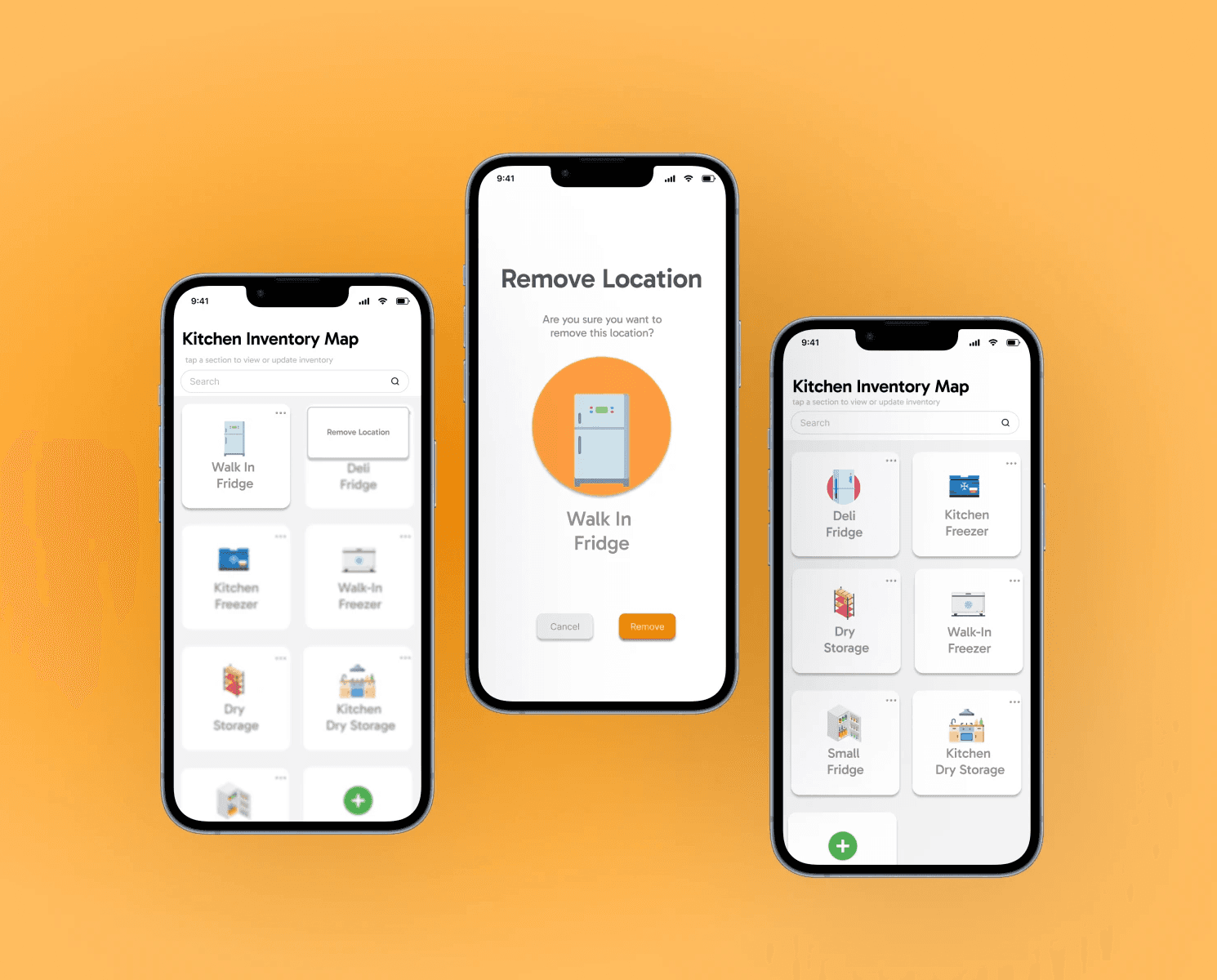
Remove a Storage Location
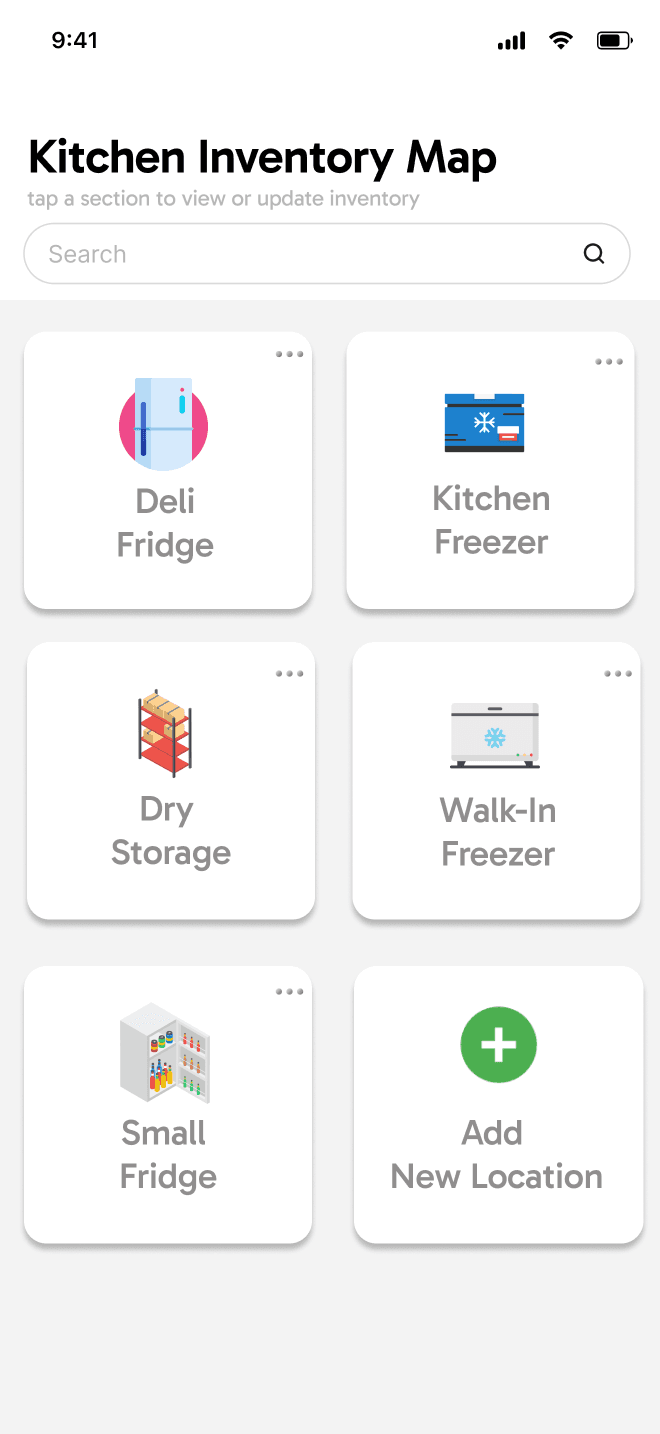
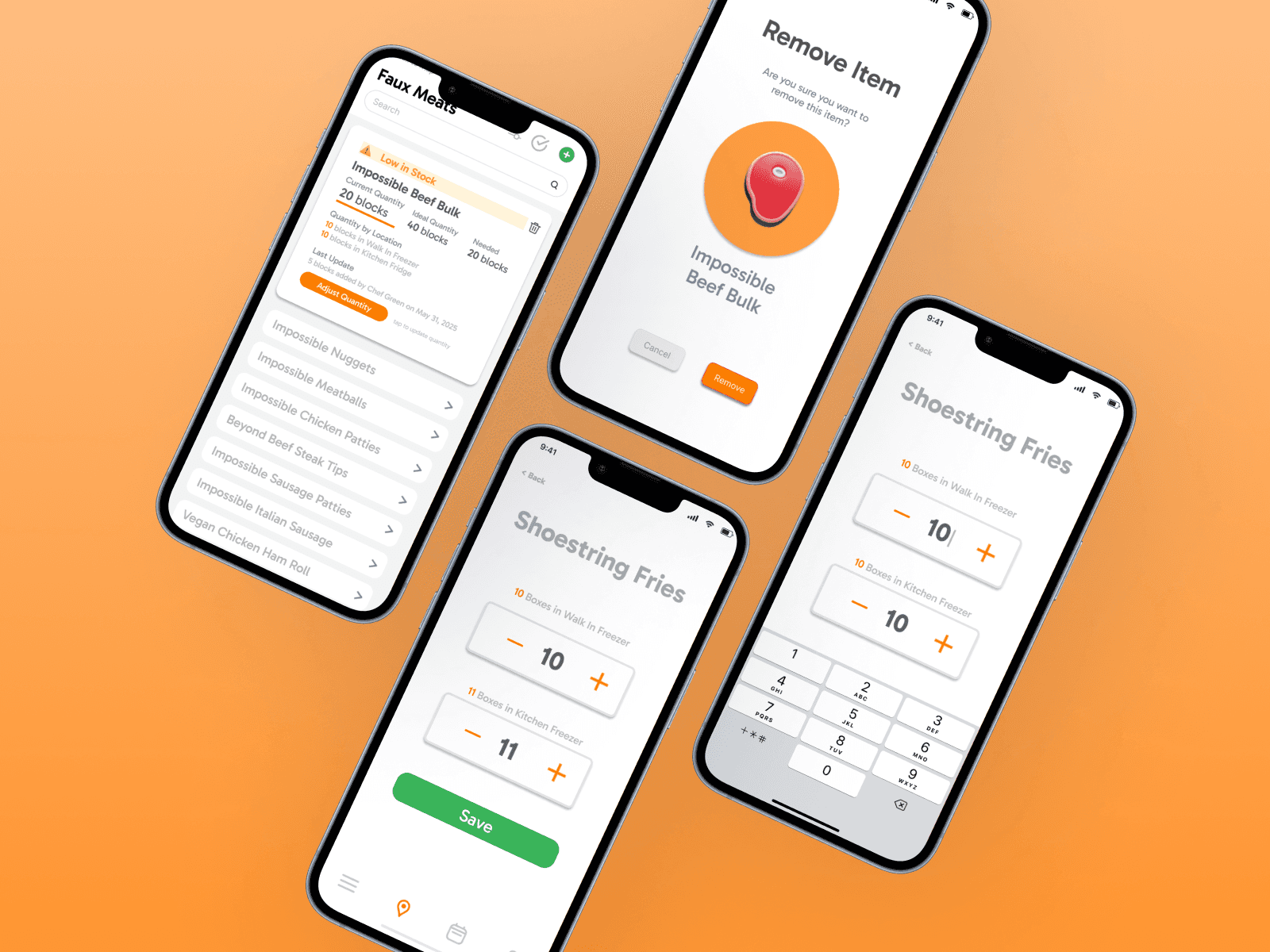
Easily keep the map updated by removing unused storage areas. A quick menu and full-screen confirmation make the process simple, safe, and fast even during busy shifts.
Update Item Quantities by Location
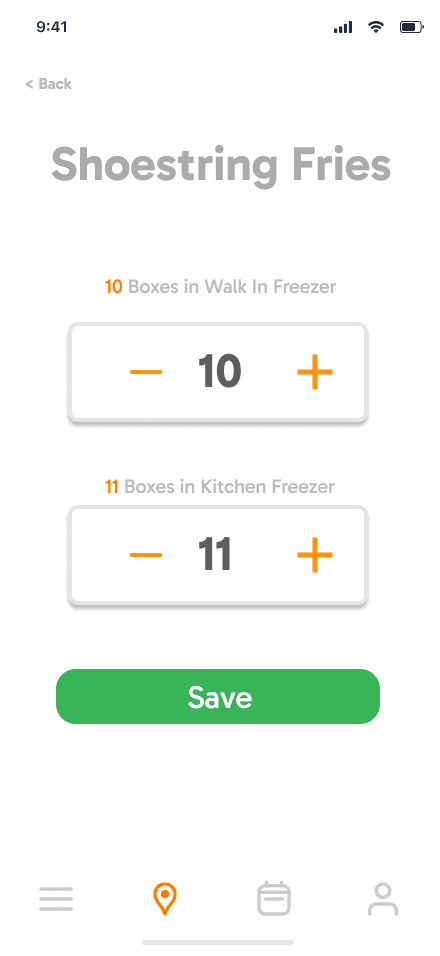
Quickly adjust stock with totals and per-location breakdowns. Use +/– for small edits or type numbers for big changes. Fast, clear, and built to reduce errors.
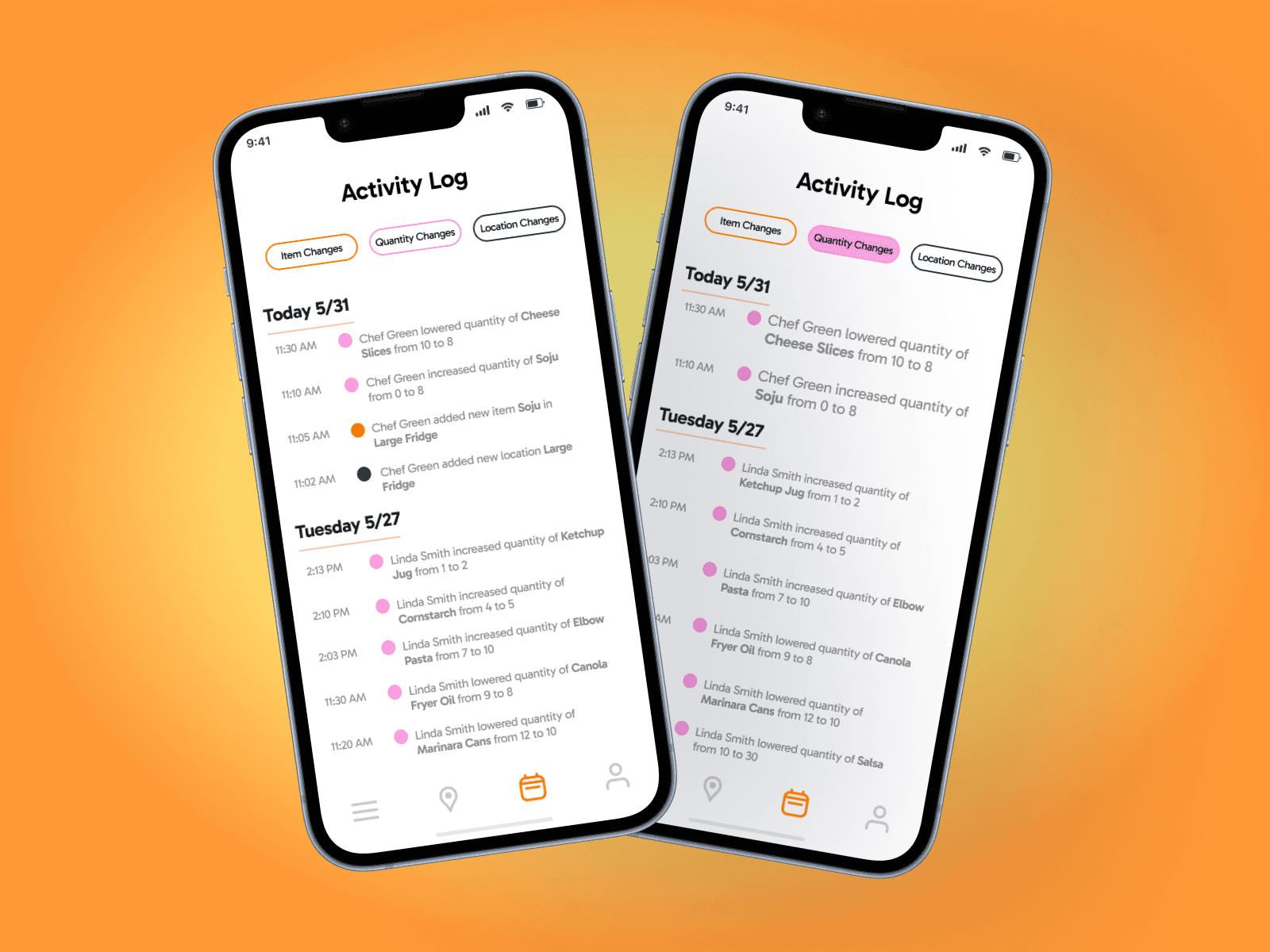
View Activty Log
Access a reverse-chronological feed of all changes with clear timestamps, user names, and color-coded dots. Filter by items, quantities, or locations to quickly find what matters.
FAQ's

Was this a real client?

Yes. This project was grounded in a real restaurant context using Val’s Vegan Kitchen as the operational reference. While access was limited, the problem space and workflows reflect real kitchen operations and constraints.

What was your role on the project?

I worked as a UX/UI Designer, contributing end-to-end across problem framing, information architecture, user flows, low-fidelity testing, and high-fidelity design. I owned key UX decisions around inventory structure and interaction flow.

What was the main design insight behind KitchenFlow?

The core insight was that kitchen staff think spatially, not categorically. Organizing inventory by physical location (fridges, freezers, prep stations) reduced cognitive load and made inventory updates faster and more intuitive under pressure.

Was this a real client?

Yes. This project was grounded in a real restaurant context using Val’s Vegan Kitchen as the operational reference. While access was limited, the problem space and workflows reflect real kitchen operations and constraints.

What was your role on the project?

I worked as a UX/UI Designer, contributing end-to-end across problem framing, information architecture, user flows, low-fidelity testing, and high-fidelity design. I owned key UX decisions around inventory structure and interaction flow.

What was the main design insight behind KitchenFlow?

The core insight was that kitchen staff think spatially, not categorically. Organizing inventory by physical location (fridges, freezers, prep stations) reduced cognitive load and made inventory updates faster and more intuitive under pressure.

Was this a real client?

Yes. This project was grounded in a real restaurant context using Val’s Vegan Kitchen as the operational reference. While access was limited, the problem space and workflows reflect real kitchen operations and constraints.

What was your role on the project?

I worked as a UX/UI Designer, contributing end-to-end across problem framing, information architecture, user flows, low-fidelity testing, and high-fidelity design. I owned key UX decisions around inventory structure and interaction flow.

What was the main design insight behind KitchenFlow?

The core insight was that kitchen staff think spatially, not categorically. Organizing inventory by physical location (fridges, freezers, prep stations) reduced cognitive load and made inventory updates faster and more intuitive under pressure.

Create a free website with Framer, the website builder loved by startups, designers and agencies.